
An album or EP is more than several singles at once. Platforms have format rules, each track needs its own codes and credits, and promotion follows a different rhythm. Using Apple Music’s official rules and Yandex Music’s help, we explain how to choose a format, sequence the tracks, prepare metadata and give your release a chance to stand out.
Single, EP or album: where are the boundaries?
The platform classifies your release by track count and duration. Apple Music publishes the most detailed rules, and other services use broadly similar boundaries:
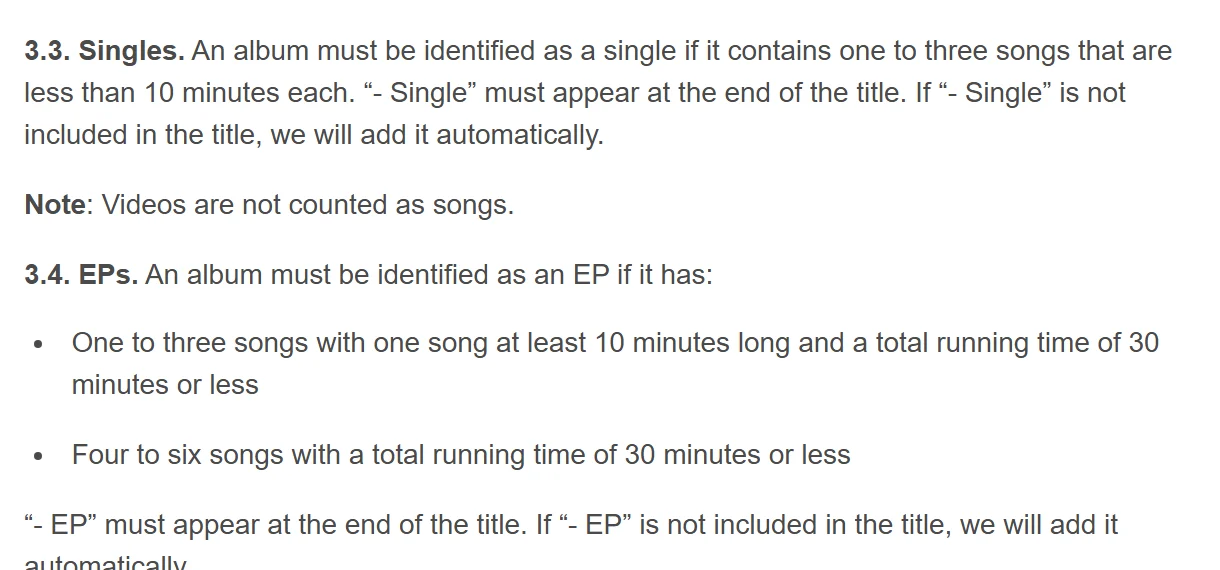
Apple automatically adds “- Single” or “- EP” to a title. Adding “Album” or the release year yourself is an error under its style rules.
Release the album at once, or start with singles?
A large release without an audience build-up can disappear into the crowd: listeners have little reason to press play on ten unfamiliar tracks. That’s why artists increasingly release in stages.
 An EP to test the watersA compact EP tests a new sound without a full album’s budget or timeline
 An album as an eventA substantial statement that can give media and platforms a clearer reason to pay attention
Every single before the album is another opportunity to reach recommendations. Our My Vibe and Nitro guide explains how this works on Yandex Music, a major Russian streaming service.
Track order and your focus track
Track order shapes the listening experience. The first tracks help determine whether someone stays, so don’t bury your strongest material at the end. Yandex Music pitching asks you to choose one key track and describe its idea and mood: that is your focus track.
- Intro · Neon
ISRC ···01 - Night Drive
ISRC ···02 - The city never sleeps
ISRC ···03 - Signals (feat. Lumen)
ISRC ···04 - Empty streets
ISRC ···05 - Dawn
ISRC ···06
 A strong openingA short intro is fine, but put the focus track in the first three
 Features belong in artist fieldsCredit contributors in metadata, not only in title parentheses
 Duration fits the formatThe 30-minute scale helps distinguish an EP from an album
What to prepare before uploading
On an album, metadata errors multiply by the number of tracks. Prepare everything in advance, separately for the release and each recording:
See the details for UPC, ISRC, cover art and our full release preparation checklist.
An album release calendar
An album needs more time than a single: more tracks mean more chances of a correction. Use this guide from finished masters through the first week after release:
Mistakes that lead to changes being requested
Most returns concern presentation rather than music. Many of these rules are explicit in Apple Music’s style guide:
For loudness and final processing, see our mastering guide.