Your artist profile is what listeners see when they find you on Yandex Music: photo, name, listener count, popular tracks and new releases. Yandex Music is a major Russian streaming service with its own catalog and artist tools. Using its official help and BandLink guidance, we explain how a profile appears, how to claim it and what that unlocks.

How your profile appears

There is no Create profile button. Yandex Music says a profile is created automatically after your first release goes live; until then, your artist page is not displayed. The route therefore starts with a distributor, who delivers the release to the catalog. The platform builds the profile from the artist name in your metadata.
1ReleaseThe distributor delivers your first release to the catalog
2ProfileYandex Music creates it automatically
3VerificationConfirm in BandLink through VK ID and UPC
4ToolsProfile edits, analytics, pitching and donations
music.yandex.ru/artist
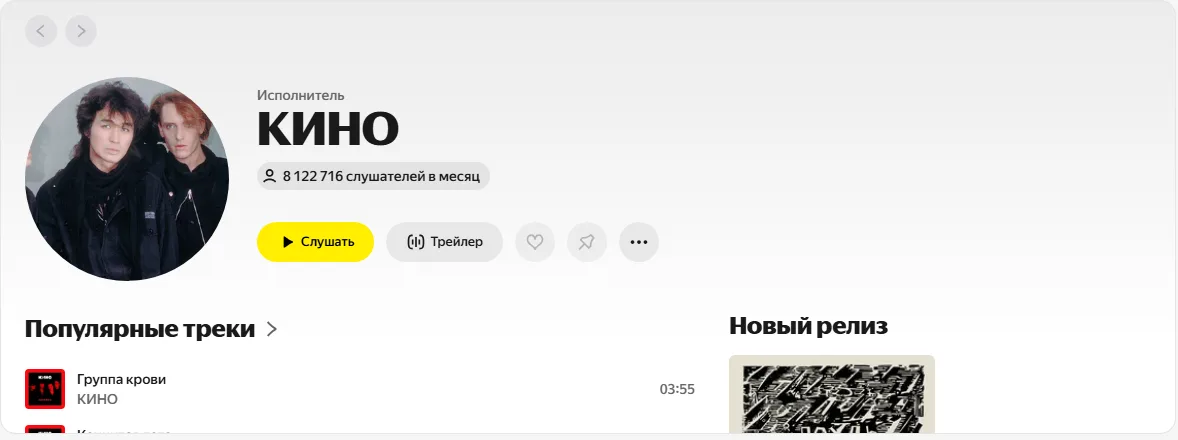
A Yandex Music artist profile: photo, name, monthly listener count and Listen button
An original Russian-language Yandex Music artist profile, using the band Kino as a public example. It shows the artist photo, monthly listeners, and popular tracks. The yellow button means “Listen.”

Your artist name determines the profile assignment

Yandex Music links releases to profiles by name. Three common problems follow, all easier to prevent than fix:

A namesake in the catalogThe track goes to another artist with the same name. Search before your first release and tell your distributor.
Inconsistent spellingDifferent case, spaces or symbols between releases can create a second profile. Keep your artist name consistent.
Not the primary artistYou’re listed as a featured contributor on your solo release. That affects profile matching and later verification.

If your track has already reached a namesake’s profile, Yandex Music support needs two links: the release and the profile it should move to. See our wrong artist profile guide.

BandLink verification in 6 steps

Yandex Music’s artist dashboard is BandLink. Until your profile is verified, you cannot request profile edits, access stats or pitch releases. Yandex Music says verification works in the full website, so try BandLink on a computer if it doesn’t work on your phone.

1The Verification buttonFind it in the BandLink dashboard’s side menu
2Artist nameExactly as shown on Yandex Music
3Sign in with Yandex IDYour profile links to this ID, which is also needed for donations
4Details and roleFirst and last name, working email and role: artist or manager
5VK ID and UPCSign in through VK, add a website if you have one, and give the UPC of your latest solo release
6Decision by emailYour application result arrives by email
bandlink.ru
Identity confirmation through VK ID in BandLink
BandLink’s Russian-language identity verification screen. The selected method is “Via VK ID,” and the blue button means “Sign in with VK ID.”
bandlink.ru
BandLink verification form: name, email, website and role
BandLink’s Russian-language verification form: first name, last name, work email, official website, and role. The selected role is “Artist”; the bottom buttons mean “Back” and “Continue.”
bandlink.ru
Artist verification in BandLink: what it unlocks
BandLink’s Russian-language artist verification introduction lists analytics, donations, pitching, and profile tools. The red button means “Choose an artist”; the bottom button means “Continue.”
i

UPC identifies a whole release, not a track. In creator, it appears after approval: open the release in your dashboard → Release details. Our UPC guide explains how it differs from ISRC.

Why verification requests are rejected

Yandex Music’s listed rejection reasons concern mismatched information, rather than musical quality. Each can be addressed:

UPC
Incorrect code
Copy the UPC from your distributor dashboard instead of typing it
Feature
You aren’t the release’s primary artist
Use a release UPC where you are the primary artist
Compilation
UPC of a compilation or a release included in one
Use your own solo single, EP or album
VK
No access rights to the official page
You must be an admin or editor of the artist’s page
Role
The wrong role selected
Choose artist or artist manager in the application
Label
An application on behalf of a label
The artist verifies first, then grants the label access

Only the distributor can change the primary artist on an already published release.

What you can change on the profile

You request edits rather than changing them directly in Yandex Music: BandLink dashboard → Support chat → provide current information. Four areas can be updated:

PhotoMain profile photo and carousel images
Social mediaLinks to the artist’s current pages
Alias and video coverAliases are search terms that lead to you, such as Latin and Cyrillic spellings
DescriptionA short introduction to you and your music

Your distributor adds video shots and music videos, delivered to the catalog alongside releases.

What a verified profile unlocks
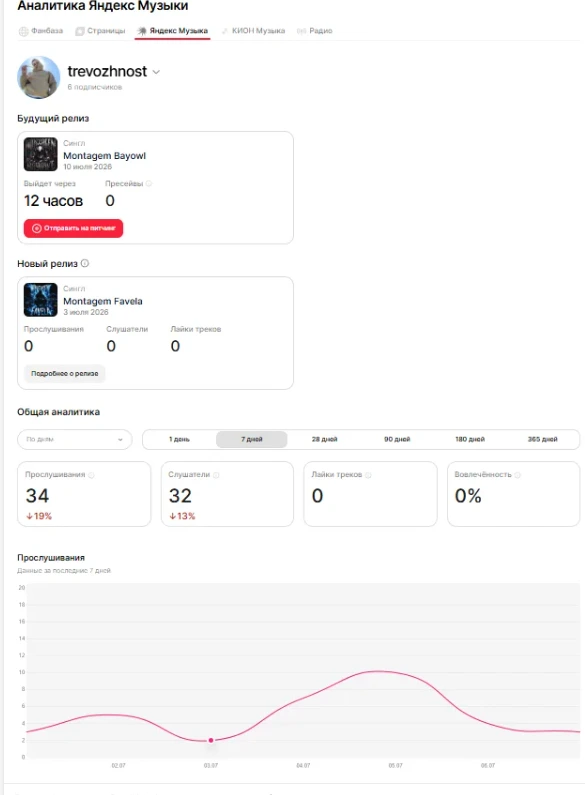
BandLinkAnalyticsStreams, listeners, likes, engagement and superfans: people who heard 3+ of your tracks in 28 days

before releasePitchingSubmit an upcoming release to Yandex Music editors and recommendation tools

after pitchingNitroFor artists with up to 5,000 listeners: a system that finds a track’s first audience

DonationsA Donate button through Yandex Tips; only the artist can enable it

paidImpulseRelease ads on Yandex Music and the Yandex Advertising Network
2–4 daysafter delivery, the Pitching button appears in BandLink
up to 5,000monthly listeners: the threshold for pitching to open the route to Nitro
₽10,000minimum Impulse campaign budget, with a duration from 7 days
bandlink.ru · analytics
The BandLink Analytics section with Yandex Music stats
BandLink’s Russian-language Analytics page. The upcoming release has a “Submit for pitching” button; the charts below show streams and listeners. Button and section names here are English translations of the labels shown.
bandlink.ru · pitching
Upcoming release and pitch submission in BandLink
BandLink’s Russian-language pitching introduction explains how a pitch can help reach listeners, editorial playlists, and My Vibe. The bottom button means “Continue.”
bandlink.ru · pitching
BandLink pitch form: describing the key track
The Russian-language BandLink form asks for a “Focus track” and “About the release”: describe its idea, mood, and inspirations. The bottom buttons mean “Back” and “Continue.”

Donation requirements are strict: use the same Yandex ID as verification, match your Tips name and photo to the artist profile, and enable donations for only one artist per BandLink account. See our Yandex Music pitching guide for the application.

If you release through creator

One name across releasesEnter your artist name consistently whenever you upload
UPC in your dashboardAfter approval: release → Release details → UPC for verification
Delivery to connected servicesReview usually takes up to 2–3 business days; each platform sets publication timing

No profile after release? Start with the direct release link. If the release itself is missing, follow our delivery checklist. If it is live under someone else’s name, contact support with the release link and intended profile.

Your action plan
1Release your first track through a distributor
2Check that it appears on your profile
3Get the UPC of your latest solo release
4Get verified in BandLink
5Update your photo, description, links and alias
6Enable donations and pitch releases ahead of time