The short answer: before uploading, check your lossless master, rights, artist name, songwriting credits, explicit flag, release date, and square cover art. For creator, the cover art must be exactly 3000×3000 px. See our track cover art guide for detailed restrictions and examples.
What to check before uploading a release
Most review rejections and delays come down to small details rather than complicated violations: the wrong audio format, cover art that is 200 pixels too small, or a typo in the artist name. Each detail costs time, and your release schedule may already include announcements, pitching, and promotion. Checking everything in advance is easier than explaining to your followers why release day has moved.
Audio: one lossless master with no clipping
Streaming services receive your master through a distributor, so the delivery dashboard sets the final upload requirements. A lossless WAV without clipping is a practical starting point, with a sample rate and bit depth that meet your distributor’s requirements. Converting an MP3 back to WAV will not restore lost quality.
Before exporting, check three things:
- No clipping. Peaks above 0 dBFS cause distortion when platforms process the audio. Check them in your DAW or with a free analyzer.
- Do not master to a single LUFS number. Spotify uses −14 LUFS as a playback normalization target, not as a mandatory loudness level for uploaded masters. Preserve the dynamics, avoid clipping, and listen on several playback systems.
- Clean beginnings and endings. Remove unnecessary silence at the start and avoid cutting off the ending, unless that is a deliberate creative choice.
Clipping and an overly loud master are among the most common technical reasons a track sounds worse on a streaming service than in the studio.
Metadata: where time is most often lost
Metadata is more than a box to tick. It is the information platforms use to index your track and inform recommendations. Check these key fields:
- Track title. Keep additions such as “official,” “prod. by,” or “HD” out of the title field. Featured artists and producers have their own fields.
- Artist name. It must match the cover art and your existing streaming profiles character for character. Otherwise, a service may create a duplicate artist profile instead of adding the release to your current one.
- Genre. Choose the closest fit: it helps inform genre playlists and algorithmic recommendations.
- Songwriters and contributors. Credit everyone, including the composer, lyricist, and featured performers. These details affect royalty collection through rights societies and the accuracy of displayed credits. Spotify’s official metadata guidance recommends complete credits.
- Release date. We cover this below. A mistake here can cost more than any of the others.
Cover art: the essentials every service checks
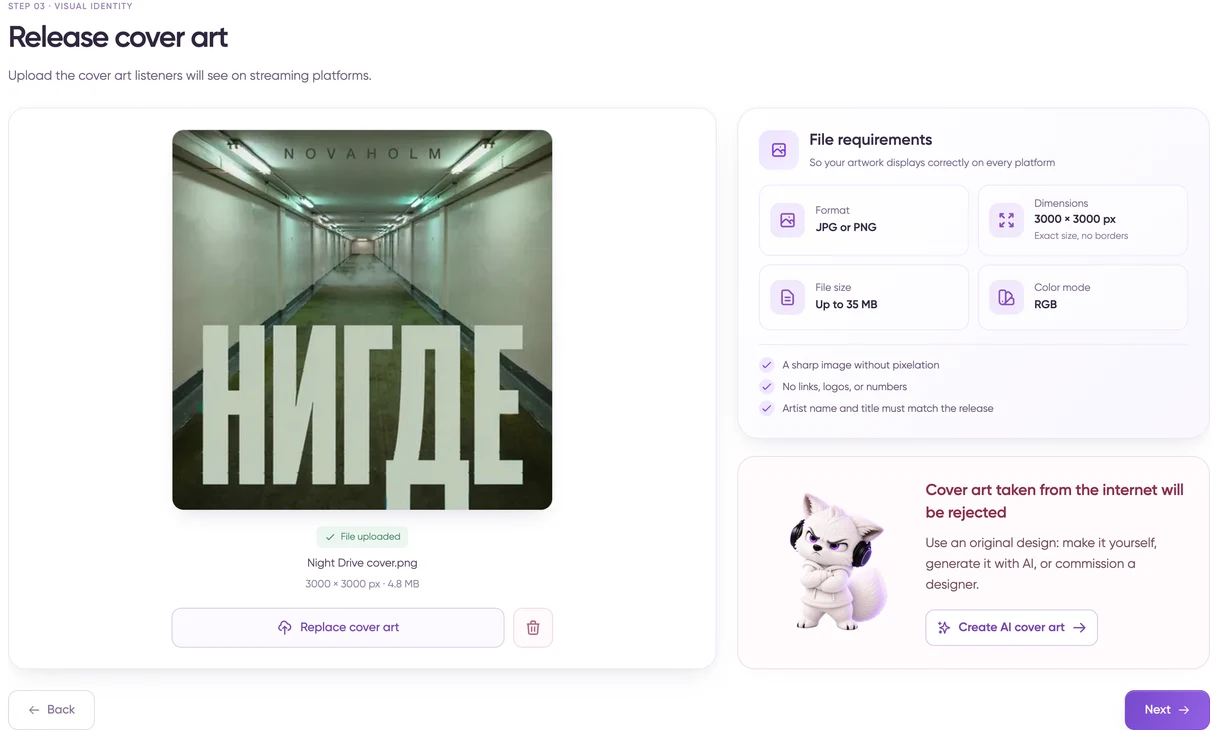
Keep your original cover art at the highest available quality. For creator, export an exactly 3000×3000 px JPG or PNG in RGB, without links, prices, or advertising. If you use another delivery dashboard, check its specifications: Apple Music lists a minimum of 4000×4000 px, while Spotify accepts square cover art from 640 to 10000 px. See our release cover art requirements for details.
Release date: why to allow 2–4 weeks
The release date is more than a form field. It sets the schedule for both review and pitching.
Review times vary by platform. In distributor experience, VK Music, a major Russian streaming service, takes 1–5 business days. Yandex Music does not officially publish an exact review time, but the BandLink pitch button appears 2–4 days after the distributor confirms the release, by which point the review has already happened. Set the release date too close and the track may still be under review when it is due to appear in the catalog.
Pitching needs even more lead time. Spotify officially asks for at least 7 days between delivery and release day; otherwise pitching in Spotify for Artists and inclusion in followers’ personalized Release Radar may not be available. For Yandex Music, the recommended submission window through BandLink is at least 2 weeks before release day, apart from the separate Nitro accelerator, which accepts applications up to release day itself.
A useful rule: if you plan to pitch to even one platform, allow 2–4 weeks between uploading the finished release and release day. That time is useful: build interest with announcements rather than losing momentum as soon as the music goes live.
Use the lead-up to your release for promotion: share a teaser, post Stories with your smart link, and reconnect with your existing followers.
Plan your first 48 hours after release
Going live is the beginning, not the finish line. Major platforms start collecting recommendation signals quickly. According to an official VK team post, a new track can enter VK Mix recommendations less than 30 minutes after release. The system then tests it with a core group of likely listeners and broadens its reach based on likes, saves, and completed listens. Yandex Music’s My Vibe follows a similar principle, although it does not publish comparable timing: positive early responses can improve a track’s chances of staying in recommendations.
Here is a practical plan for the first day or two:
- Prepare your announcement before release day. Your social post, Stories with a smart link, and mailing-list message should be ready when the music goes live, rather than improvised on the day.
- Ask your most engaged listeners to listen and save. Friends, regular fans, and community members can provide useful signals through likes and playlist saves sooner than random streams do.
- Check that the release is live on every selected platform. One service may occasionally lag a day or two behind the others. Spot it early and contact your distributor’s support team if needed.
- Avoid metadata changes during the first few days. Updates after release can be slow and may reach different platforms at different times. In some cases, they can also reset accumulated engagement statistics.
Your final pre-upload checklist
- WAV, at least 16-bit, 44.1 kHz, no clipping, and loudness around −14 LUFS.
- Cover art exported for creator at exactly 3000×3000 px, JPG or PNG, RGB, with no links, prices, or advertising; original file saved separately.
- Track title and artist name checked for errors and matching the cover art.
- Genre, songwriting credits, and contributor details completed.
- Release date set 2–4 weeks ahead if you plan to pitch.
- Social announcements and Stories prepared, with a plan for the first 48 hours.
Run through this list before every release and you can avoid most common causes of rejection or delay. Upload your finished release at creatormusic.ru: the system checks the audio format and cover art dimensions during upload, and after review your track is delivered to 70+ platforms.